If your Google Ads campaigns are getting clicks but not enough qualified leads or sales, the answer usually isn’t to spend more money. It’s to look closer. How to improve Google Ads performance starts with one question: are the right people seeing the right message, landing on the right page, and taking the right action? That’s it. That’s the whole game.
Google Ads can be remarkably precise. But that precision only works if the fundamentals are dialed in: campaign structure, search intent, ad relevance, landing page experience, conversion tracking, audience signals, and ongoing testing. A campaign can post a healthy click through rate and still burn a budget if the traffic isn’t qualified. A campaign can also generate plenty of conversions while quietly overpaying for every single one.
The good news? Most performance problems don’t require rebuilding the account. They require fixing what’s already broken.
Here are five practical ways to improve Google Ads performance, starting with the areas most likely to be hiding wasted spend.
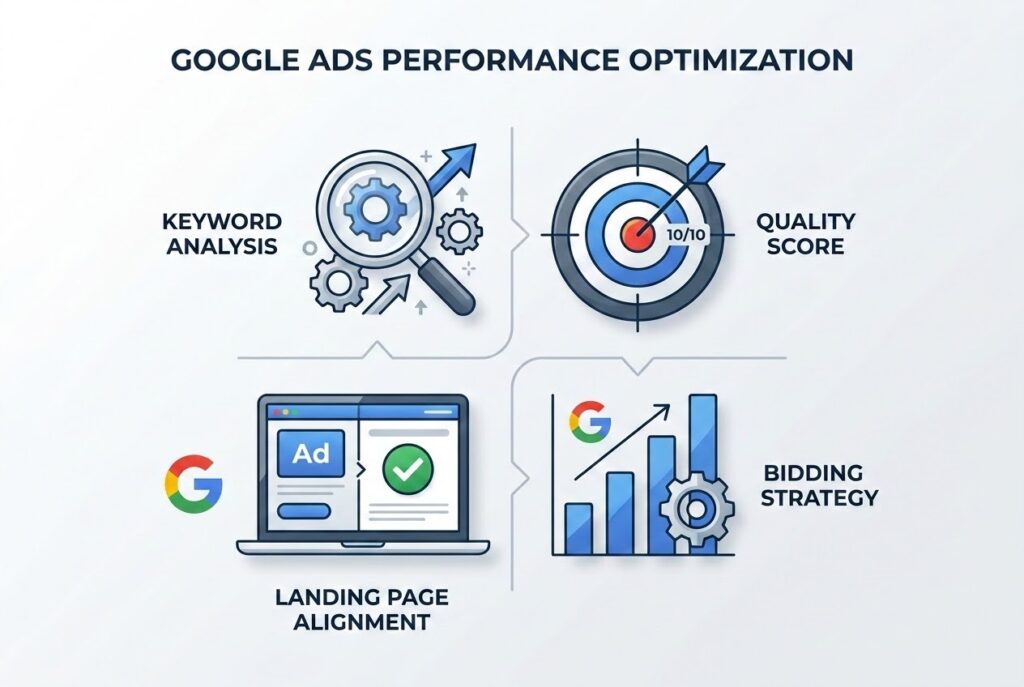
1. Tighten Keyword Match Types and Negative Keywords
Keywords determine when your ads become eligible to appear. They don’t determine what a person actually typed to get there, and that gap is where the budget quietly disappears.
This is where search term analysis becomes one of the most important parts of Google Ads optimization. A business targeting “commercial cleaning services,” for example, might discover its ads are also picking up searches for jobs, training courses, DIY advice, or free services. Those clicks show up as traffic in the dashboard. They are not customers.
Broad matches have real value. It helps advertisers discover new relevant searches, especially when paired with strong automated bidding and solid conversion data. The problem isn’t the broad match itself. The problem is treating it as “set it and forget it.”
Make search term review a habit, not an afterthought. Look for patterns that don’t belong, and cut them loose with negative keywords. A company selling professional software, for instance, might exclude “free,” “course,” “tutorial,” “jobs,” or “salary” the moment those terms start pulling in the wrong audience.
The goal here isn’t to shrink your keyword list into oblivion. It’s to make every dollar of traffic intentional.
Build a monthly routine around three questions: which searches generated clicks, which generated conversions, and which just ate budget without producing anything meaningful? That single habit surfaces opportunities that keyword level reporting will never show you on its own.
If you’re wondering how to improve Google Ads performance, start with what people are actually searching, not what you typed into the campaign.
2. Optimize for Ad Quality, Not Just Bids
Here’s a common misconception: the advertiser willing to pay the most automatically wins the best position.
That’s not how the auction works. Google’s Ad Rank considers more than the bid: ad quality, landing page experience, competition, and other factors all play a role. Google itself describes Quality Score as a diagnostic tool built on three components: expected click through rate, ad relevance, and landing page experience.
That distinction matters more than most advertisers realize.
Quality Score isn’t a number to chase for its own sake. Google is explicit that it exists to flag where your ads, keywords, or landing pages need work. Think of it less as a scoreboard and more as a warning light on your dashboard.
If ad relevance is below average, ask whether your ad actually reflects what the searcher wants. If expected CTR is weak, your messaging may not be giving people a real reason to click. If landing page experience is weak, the breakdown is happening after the click, which no amount of bidding will fix.
That’s exactly why raising bids is often an expensive way to paper over a relevance problem. You end up buying more visibility without ever solving what’s stopping visitors from becoming customers.
The smarter move is to treat your campaigns as a connected system: keyword, search intent, ad, landing page, conversion. Looking at CPC in isolation tells you almost nothing by comparison. It’s a lesson we lean on heavily in our paid marketing work with clients like Ace Screws, where fixing relevance, not just raising spend, is what moves revenue.
3. Match the Landing Page to the Ad’s Intent
Want an easy way to waste paid search traffic? Send every single visitor to the homepage.
Picture someone searching “emergency commercial plumbing repair.” They click an ad promising immediate commercial service, and land on a generic homepage where they have to hunt for what they actually need. That’s friction the campaign created for itself.
Google’s own guidance backs this up: choose a landing page that closely matches the ad and keywords, and keep the messaging and call to action consistent with what the ad promised. The principle is simple. The click should feel like the obvious next step, not a detour.
A campaign for a specific service should lead to a page about that service. An ad promoting a specific offer should lead to a page where that offer is immediately visible. A lead gen campaign should make the desired action unmistakable.
This is also where conversion rate tells the real story. Say Campaign A gets 1,000 visitors and generates 20 leads. Campaign B gets only 600 visitors but generates 30 leads. Campaign B is winning, even with a fraction of the traffic.
That’s the truth a lot of advertisers miss: a lower cost per click in Google Ads isn’t automatically better performance. A cheap click that never converts can cost your business more than a pricier click from a genuinely qualified prospect.
When you audit a landing page, start with the fundamentals: relevance, message consistency, page speed, mobile usability, trust signals, form friction, calls to action, and whether the page answers the visitor’s question immediately. Ad performance doesn’t stop at the click. It’s just getting started.
4. Use Audience Signals and Smart Bidding Strategically
Google Ads has become increasingly automated. That doesn’t mean strategy is optional. It means strategy matters in a different place.
Smart Bidding uses machine learning to optimize bids at the auction level, based on signals and the likelihood of a conversion or conversion value. Google names Maximize Conversions, Target CPA, Maximize Conversion Value, and Target ROAS as its core Smart Bidding strategies.
As of August 17, 2026, Google is also rolling out changes to how bidding behaves for budget limited campaigns, so if you’re running Target CPA or Target ROAS, keep an eye on performance shifts and stay current with Google’s guidance.
Here’s the lesson underneath all of it: Smart Bidding isn’t magic. It works from the signals you feed it. If your conversion tracking is incomplete, if the campaign is optimizing toward low value actions, or if your account can’t tell a qualified lead from a meaningless form fill, the system will make confident decisions based on the wrong objective.
So the first question isn’t “which automated bidding strategy should I choose?” It’s “what exactly am I asking Google to optimize for?”
For ecommerce, that might mean optimizing for purchase value instead of just counting transactions. For lead generation, it means optimizing for qualified leads, not every form submission that comes through the door.
Audience signals add useful context on top of that. Google says Smart Bidding can factor in device, location, time of day, remarketing lists, browser, language, and other contextual data when setting bids.
It’s worth staying skeptical here, too: more automation does not automatically mean better performance. Smart Bidding still needs accurate conversion tracking, sensible campaign structure, and realistic business goals underneath it. Weak foundations just mean the machine optimizes faster toward the wrong outcome. This is the same principle behind how we think about AI driven marketing tools more broadly: automation is only as good as the strategy feeding it.
The real answer isn’t manual control versus automation. It’s a strong strategy, supported by automation.
5. Test Ad Creative and Assets Continuously
Even a well built campaign goes stale. That’s not a flaw. It’s just how markets move.
Competitors change their offers. Search behavior shifts. Customer priorities evolve. A headline that was converted six months ago might be dead weight today.
Responsive Search Ads let Google combine multiple headlines and descriptions to find the combinations most relevant to individual searches. Google also recommends using a full range of asset types and reviewing asset level performance to see which creative elements are actually earning their keep.
That gives advertisers room to test messaging without rebuilding every ad from scratch.
Test meaningful differences, not cosmetic ones. Compare a headline built around speed against one built around expertise. Test a specific benefit against a broader value proposition. Know exactly what you’re testing before you launch it.
And don’t change five headlines, the landing page, targeting, bidding strategy, and budget all at once, then try to figure out which change moved the needle. That’s not testing. That’s guessing with extra steps.
Assets deserve the same attention. Sitelinks direct people to useful pages. Callouts highlight differentiators. Structured snippets add context about products or services. Google recommends using the full range of relevant asset types because they give searchers more ways to engage, and give your ad more surface area to be useful.
For a local business, that might mean call assets or location assets. For a service company, sitelinks might point straight to specific services, financing details, reviews, or a contact page.
The goal was never to make the ad bigger. It’s to give the right searcher more of what they actually need before they decide to click.
Google Ads Performance Is a System, Not a Single Metric
There is no single trick that consistently fixes every campaign. Anyone who tells you otherwise is selling something.
A campaign can post excellent CTR and a poor conversion rate. Another can carry relatively expensive clicks while generating highly profitable customers. One account needs tighter keyword controls. The next has a landing page problem that has nothing to do with bidding at all.
That’s why performance has to be evaluated across the entire customer journey, not one dashboard metric at a time.
Start with the search terms. Confirm you’re attracting the right intent. Review ad relevance and messaging. Evaluate the landing page. Verify conversion tracking is capturing meaningful actions. Then, and only then, look at bidding, audiences, budget allocation, and creative testing.
That’s the real answer to how to improve Google Ads performance: cut wasted traffic, sharpen relevance, strengthen the post click experience, feed automation better signals, and never stop testing what you’re telling potential customers.
It also helps to zoom out and view paid search as one piece of a larger machine. At Adapting Social, paid media works alongside SEO, web management, content, and measurement as part of one connected strategy, because a campaign rarely fails or wins in isolation. It performs the way the whole system around it performs.
If you’re already running campaigns, an honest audit will often surface more opportunities than launching a brand new one from scratch.
Frequently Asked Questions About Google Ads Performance
1. How can I improve my Google Ads performance? Start by reviewing search terms and negative keywords, then evaluate ad relevance, landing page experience, conversion tracking, bidding strategy, and creative assets. The biggest gains usually come from fixing the weakest link in the chain, not from making one big, sweeping change.
2. How do I lower my cost per click in Google Ads? Improving ad relevance, expected CTR, and landing page experience supports stronger ad quality and more competitive performance. But chasing the lowest possible CPC shouldn’t be the goal on its own. A higher CPC can still be the better outcome if those clicks turn into more qualified leads or profitable sales.
3. Should I use broad match keywords? Broad match can be genuinely useful for surfacing relevant opportunities, especially paired with conversion focused automated bidding and disciplined search term monitoring. It’s not a substitute for real campaign strategy or negative keyword management.
4. Why are my Google Ads getting clicks but no conversions? Usually it’s some combination of weak traffic quality, an unclear offer, a mismatched landing page, a complicated form, a vague call to action, a technical issue, or inaccurate conversion tracking. Start by figuring out whether the breakdown happens before the click or after it.
5. How often should I optimize Google Ads? Monitor regularly, but don’t chase every fluctuation. Review search terms, conversions, and budget trends often, and give meaningful tests enough time and data to actually mean something before making a major strategic call.
How to Get Better Google Ad Performance
Better Google Ads performance rarely comes from spending more. It comes from making every part of the journey, from search query to conversion, more relevant, more measurable, and more useful.
When the right searchers find the right message and land on the right experience, your budget finally gets the chance to do its job.
If your campaigns feel harder to explain than they should, Adapting Social can help pinpoint exactly where the performance gap is coming from, and what deserves your attention first.